A wholesale buyer spends two days building a 40-line order on your store. Then they email you: can you send a quote? Can you apply our usual discount? Can we pay by invoice?
Everything you need is already in their cart. The hard part is getting it out.
What a Shopify draft order is
A draft order is an order you create in the Shopify admin for a customer. Merchants use it for phone, email or chat sales, custom pricing and wholesale rates. You can edit prices, add discounts and shipping, then send the customer an invoice.
The invoice includes a secure checkout link where they review and pay. The order is only created once the payment is accepted. (Shopify developer docs)
The usual way: rebuilding the cart by hand
The Shopify admin doesn't show what's sitting in a customer's cart. So you ask the buyer for a list, open a new draft order and add each product and quantity, one line at a time.
On a 5-line cart, that's fine. On a 40-line wholesale cart, it's slow, and it's where mistakes happen: a wrong variant, a missed line, a typo in a quantity. Meanwhile, the buyer waits.
The faster way: from saved cart to draft order in one click
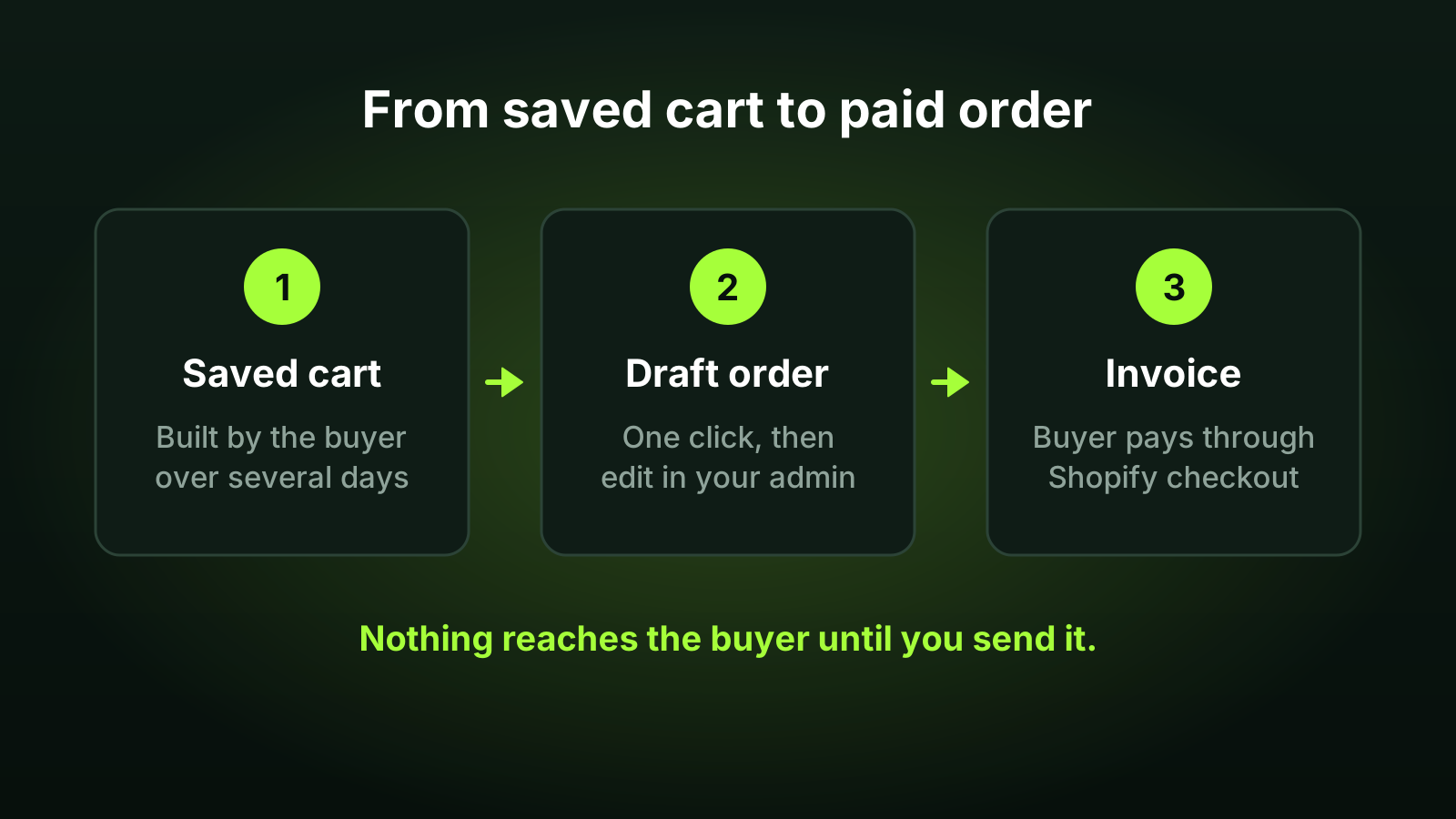
With Ecto, the cart of every logged-in customer is saved against their account. In the Ecto admin, you open the customer, see their saved cart with products, SKUs and quantities, and create a draft order from it in one click.
You choose the prices: your store prices, or the prices the customer saw in their cart, discounts and currency included.
Then:
- Open the draft order in your Shopify admin.
- Adjust prices, add a discount, shipping or a note.
- Send the invoice. The buyer pays through Shopify checkout.
Ecto only creates the draft order. What goes into it, and when it's sent, stays your call.
When it helps
Quotes. The buyer wants something to approve before committing. A draft order with an invoice link works like a quote they can pay directly.
Negotiated prices. Apply the buyer's agreed discount before you send.
Orders by phone or email. The cart is already there, no need to dictate it.
Large orders that need a check. Review stock, shipping and minimums before payment.
Try it on our live demo store, or start your free trial from the Shopify App Store.
FAQ
Can I turn a customer's cart into a draft order natively in Shopify?
Not directly. The admin doesn't show carts in progress, so the draft order is built line by line.
Does the customer have to do anything?
Just be logged in while they shop, so their cart is saved. Then they pay the invoice.
Can I change prices before sending the invoice?
Yes. Start from your store prices or the cart prices, then edit prices, discounts and shipping in the admin like any draft order.